Your calls transcribed, scored and understood.
TalkChief transcribes your team's calls automatically, labels sentiment and intent on each transcribed call, alerts supervisors when a customer needs attention and shows what drives your calls, from repeat issues to competitor mentions — in English, Arabic, Italian, French and Spanish.
Conversation intelligence your supervisors will actually use.
Listening to recordings doesn’t scale. TalkChief reads the calls you choose to transcribe, brings the ones that matter to the top and shows the patterns behind them.
Product illustrations use fictional companies, people and figures.
Understand a call without replaying it.
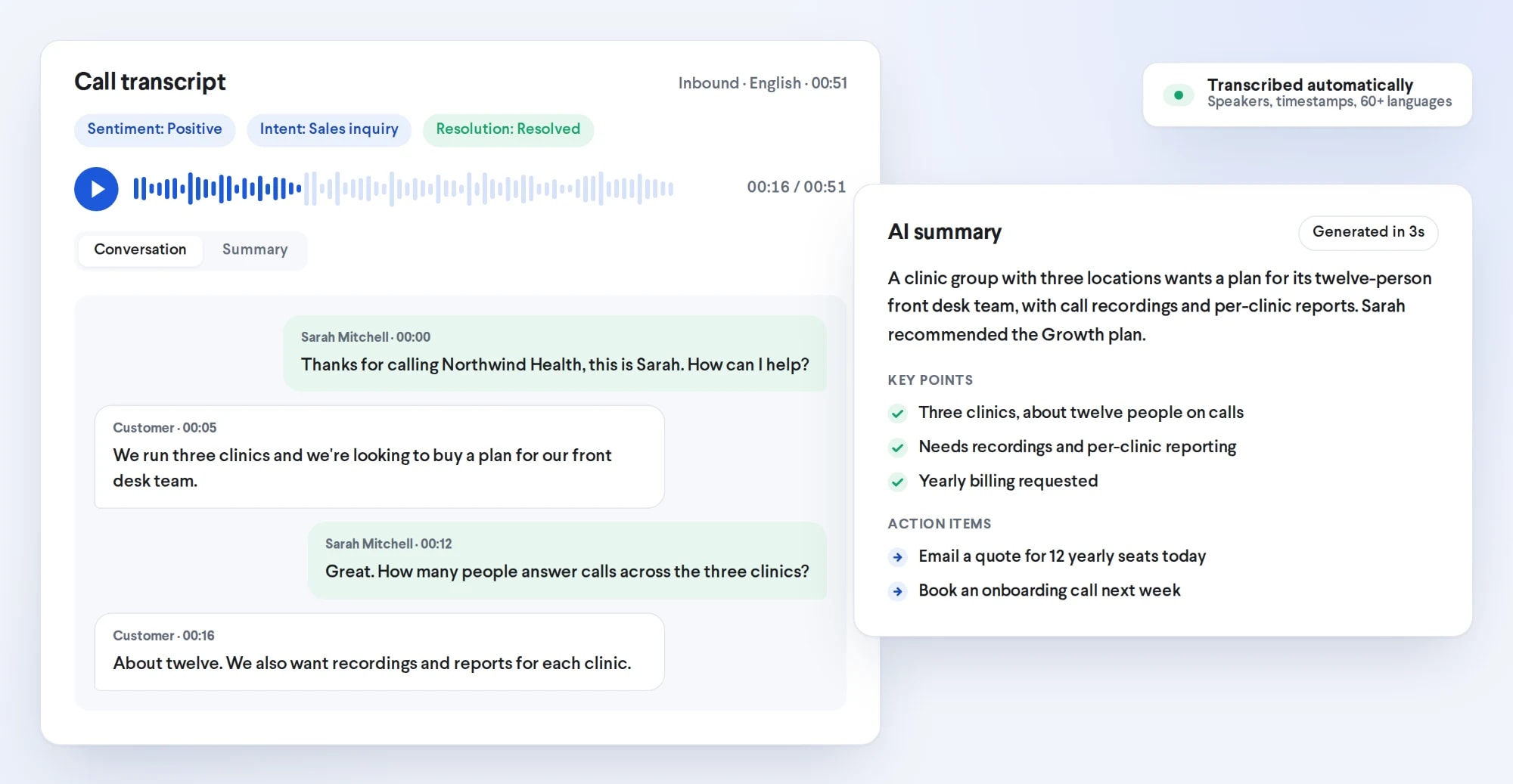
Every eligible recorded call becomes a speaker-by-speaker conversation with timestamps you can click to jump the recording. One click adds an AI summary with key points and action items, written in the language of the call — escalated calls get theirs automatically.
- Sentiment, intent and resolution labeled on each transcribed call
- Member and customer on separate sides, easy to scan
- Opens straight from the call reports your team already uses
Know which calls need a supervisor — before the customer calls back.
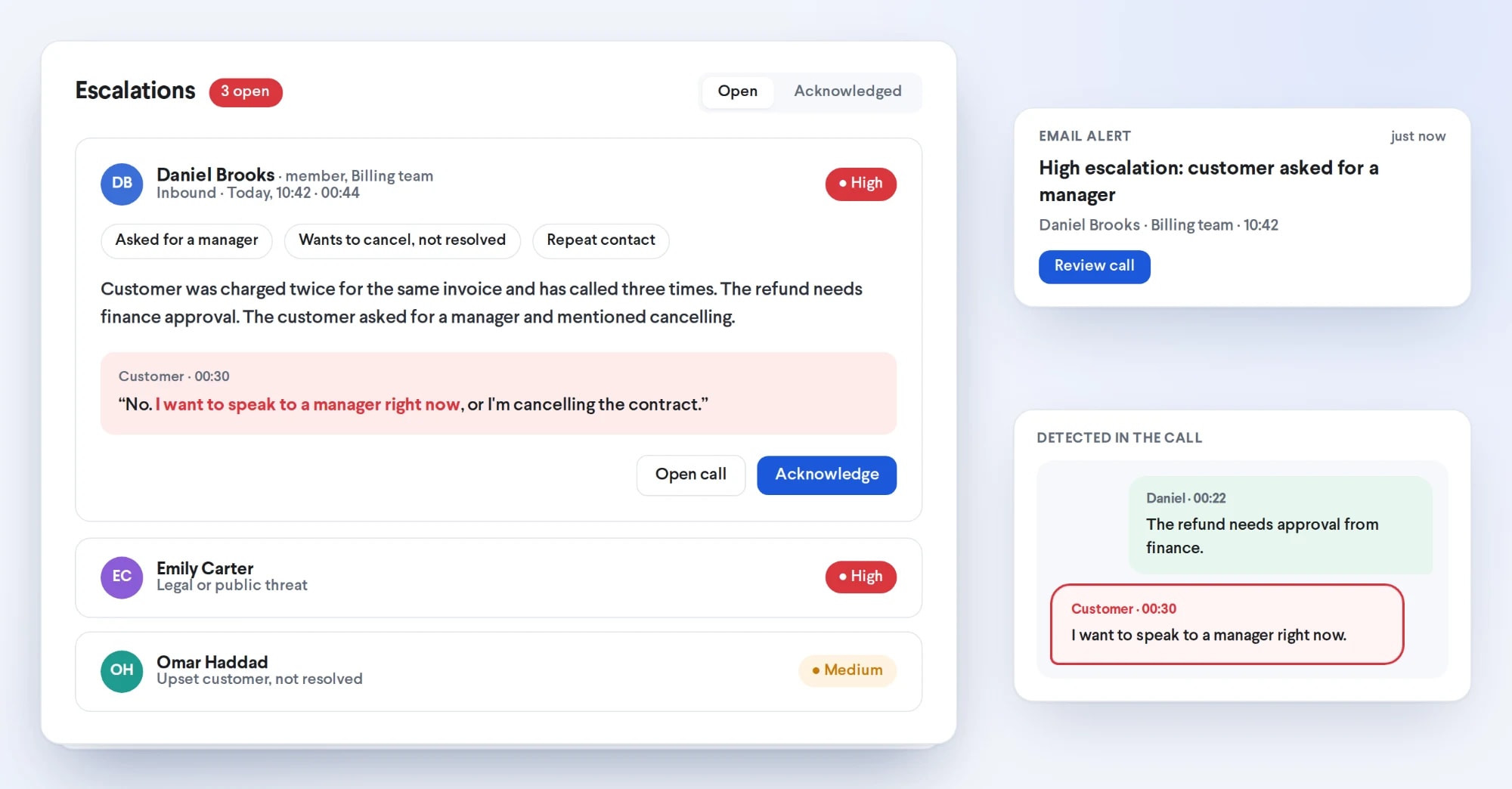
TalkChief flags calls where a customer asked for a manager, threatened action or was very upset, where a member was rude, or where a complaint or cancellation was left unresolved. Each one gets a High, Medium or Low severity, its reasons and the line where it happened.
- Escalations inbox with a severity filter and Open and Acknowledged tabs
- Open the call at the escalation line, highlighted in the transcript
- Acknowledge with a note, so everyone sees who handled it and how
- Switch detection on for the whole company or per team
Tell TalkChief what an escalation means in your business.
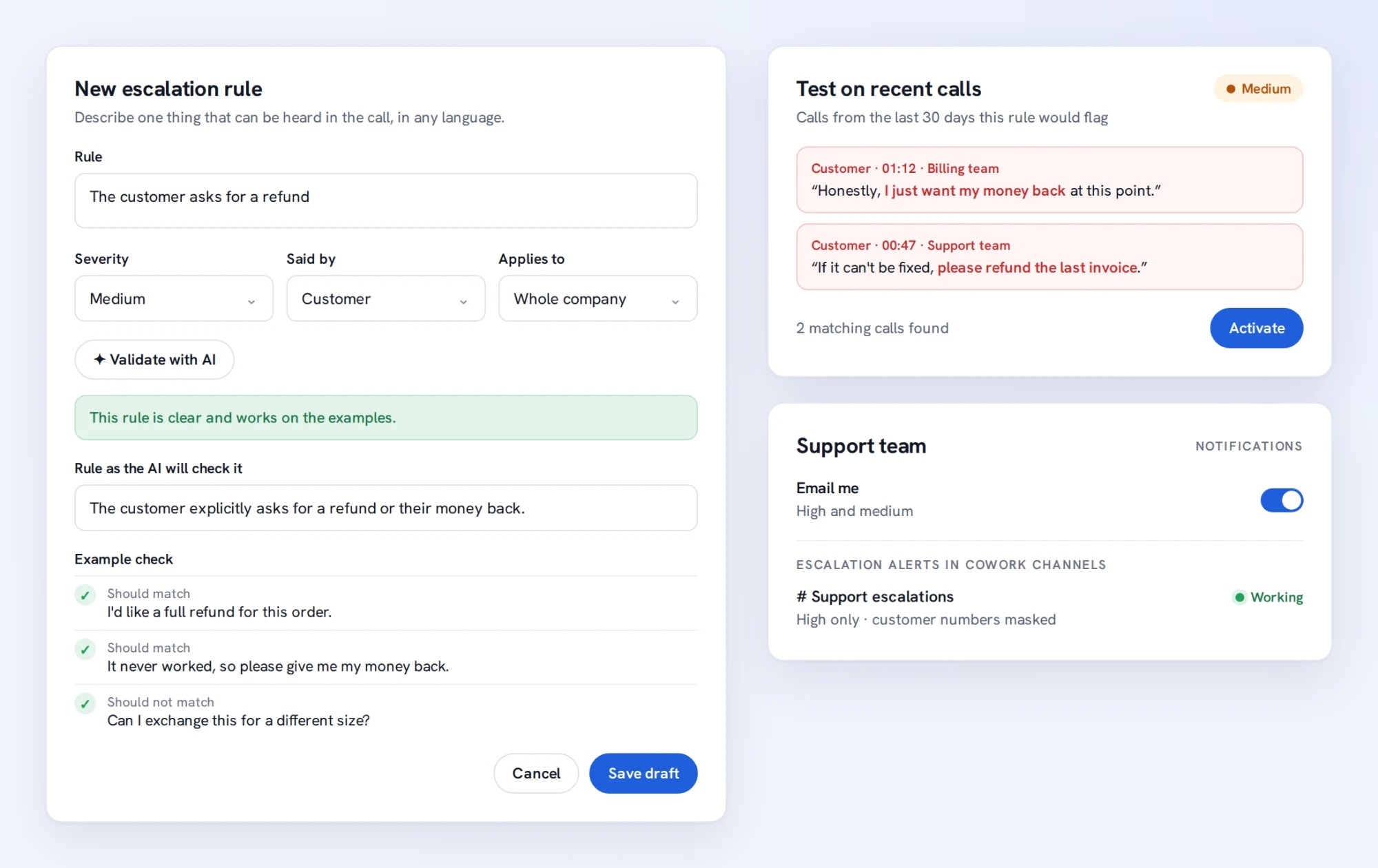
Describe one thing that can be heard in a call, in any language — a customer asking for a refund, say. TalkChief rewrites it as one clear condition and checks it on examples that should and should not match. Then test the draft on your recent calls to see which ones it would flag, and activate it.
- Choose the severity, who must say it, and the whole company or one team
- Edits are saved as a new draft while the active version keeps working
- Email alerts per team, at the minimum severity each supervisor chooses
- Post escalations to a CoWork channel, with the call summary
See how every team and member is really doing.
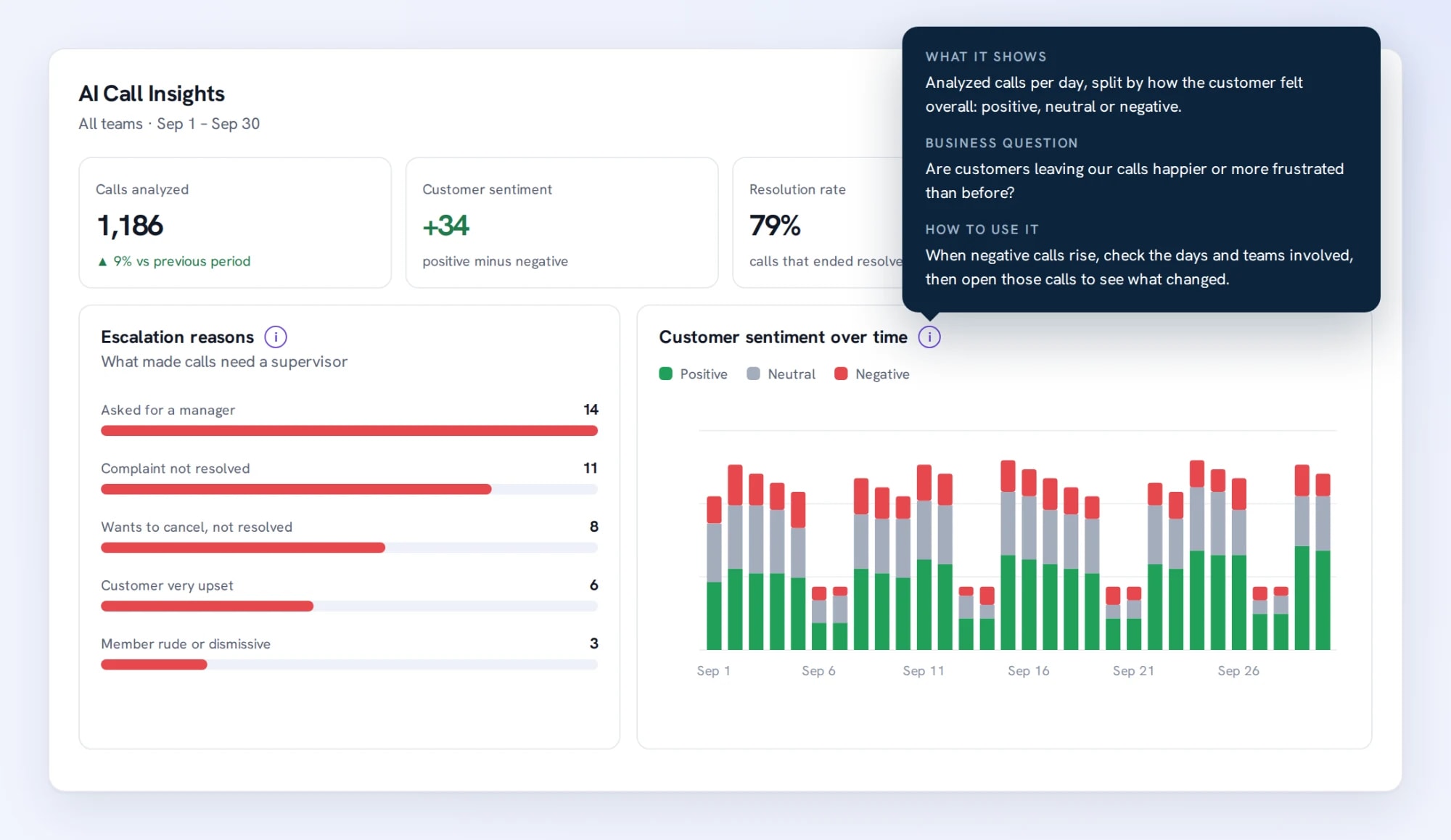
Customer sentiment over time, why customers call, resolution and escalation rates and team and member scorecards, taken from the calls themselves rather than after-call forms nobody fills in.
- Every chart explains itself: what it shows, the business question it answers and how to use it
- Filter by team, member and date range; key numbers compare with the previous period when earlier data exists
- See when problems happen with a day-and-hour heatmap
Find out why customers call — and which problems never get fixed.
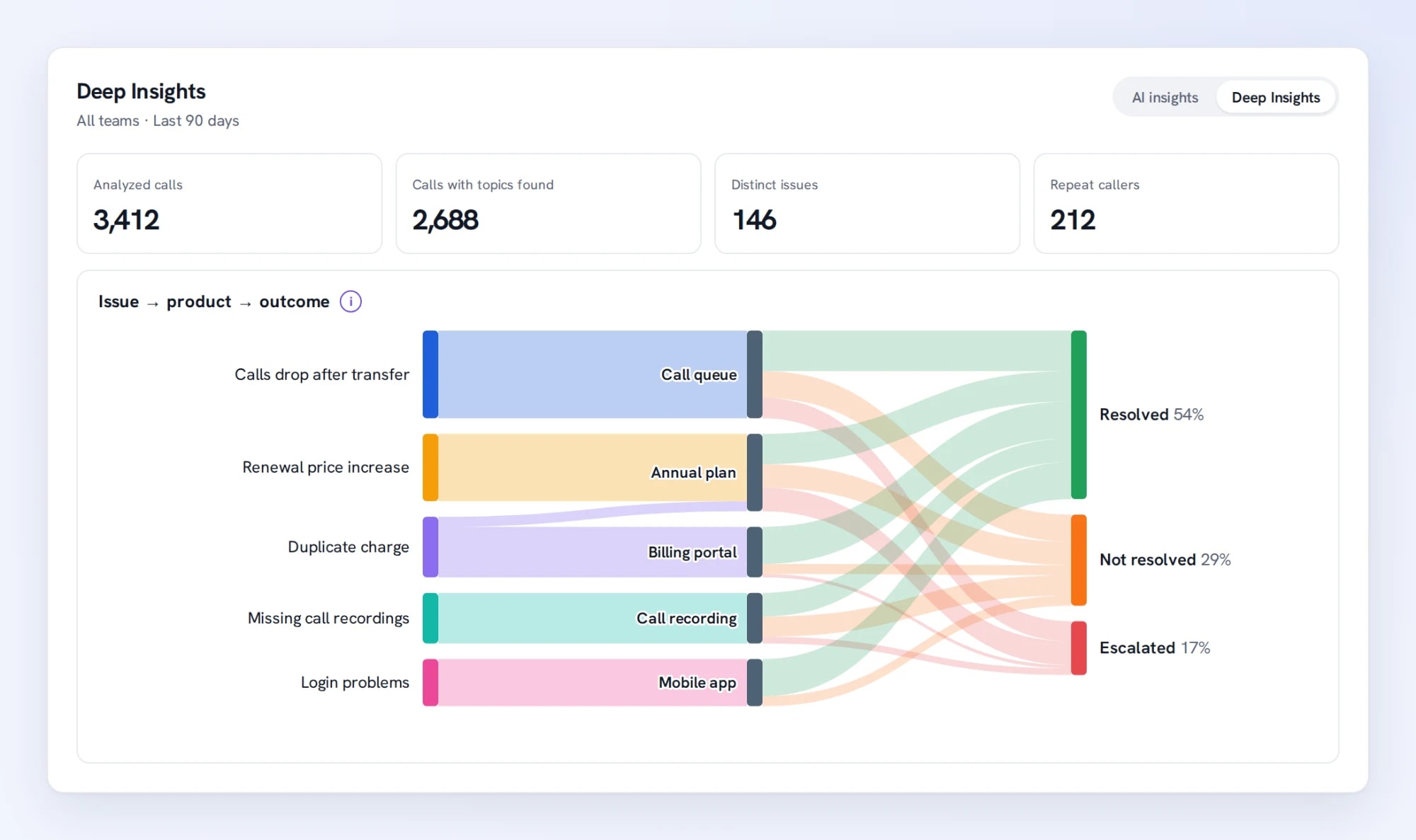
Deep Insights picks out the issues customers raise, the products they are about and how those calls end. The same issue in different words, or in English, Arabic, Italian, French or Spanish, is grouped under one label, so you see which problems drive unresolved and escalated calls.
- Why customers call, week by week, with the share left unresolved
- Issue → product → outcome: resolved, not resolved, unclear or escalated
- Resolution by member and reason, to see who needs coaching on what
Spot churn risk and the customers who keep calling back.
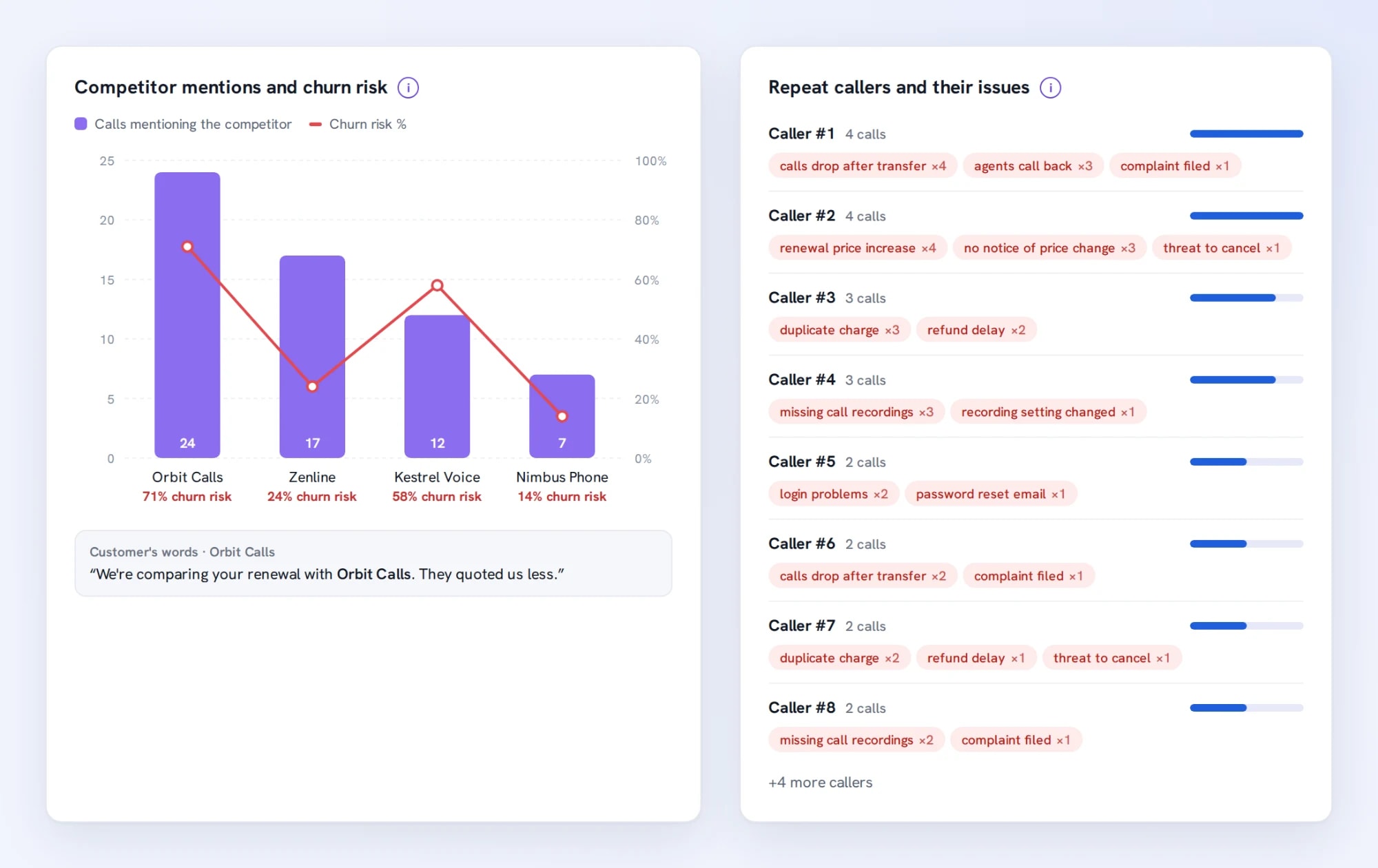
See which competitors customers mention and what share of those calls carry churn risk, with the customer’s original wording a hover away. Repeat callers are listed with their issues, so you know whom to call back first — shown as Caller #1, Caller #2, never by phone number.
- Competitor mentions and churn risk, per competitor
- Repeat callers and the issues they called about
- Included with AI transcription at no extra cost
Search what customers meant, not just what they said.
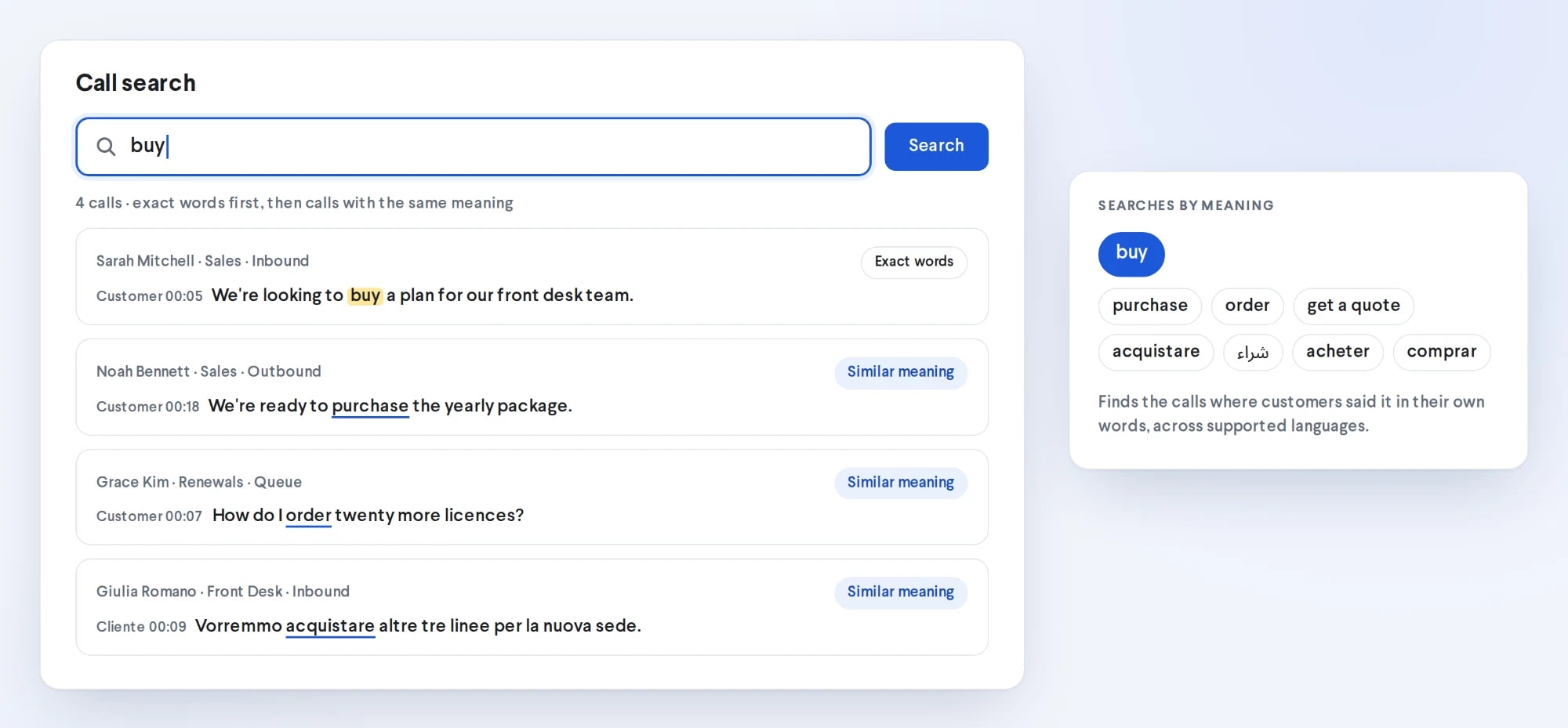
Search “buy” and find the calls where a customer said purchase or order, or asked for a quote — in any of your languages. Exact matches come first, then calls with the same meaning, each linked to the moment it was said.
- Filter by date, team, member and who said it
- One click opens the transcript at the matching line
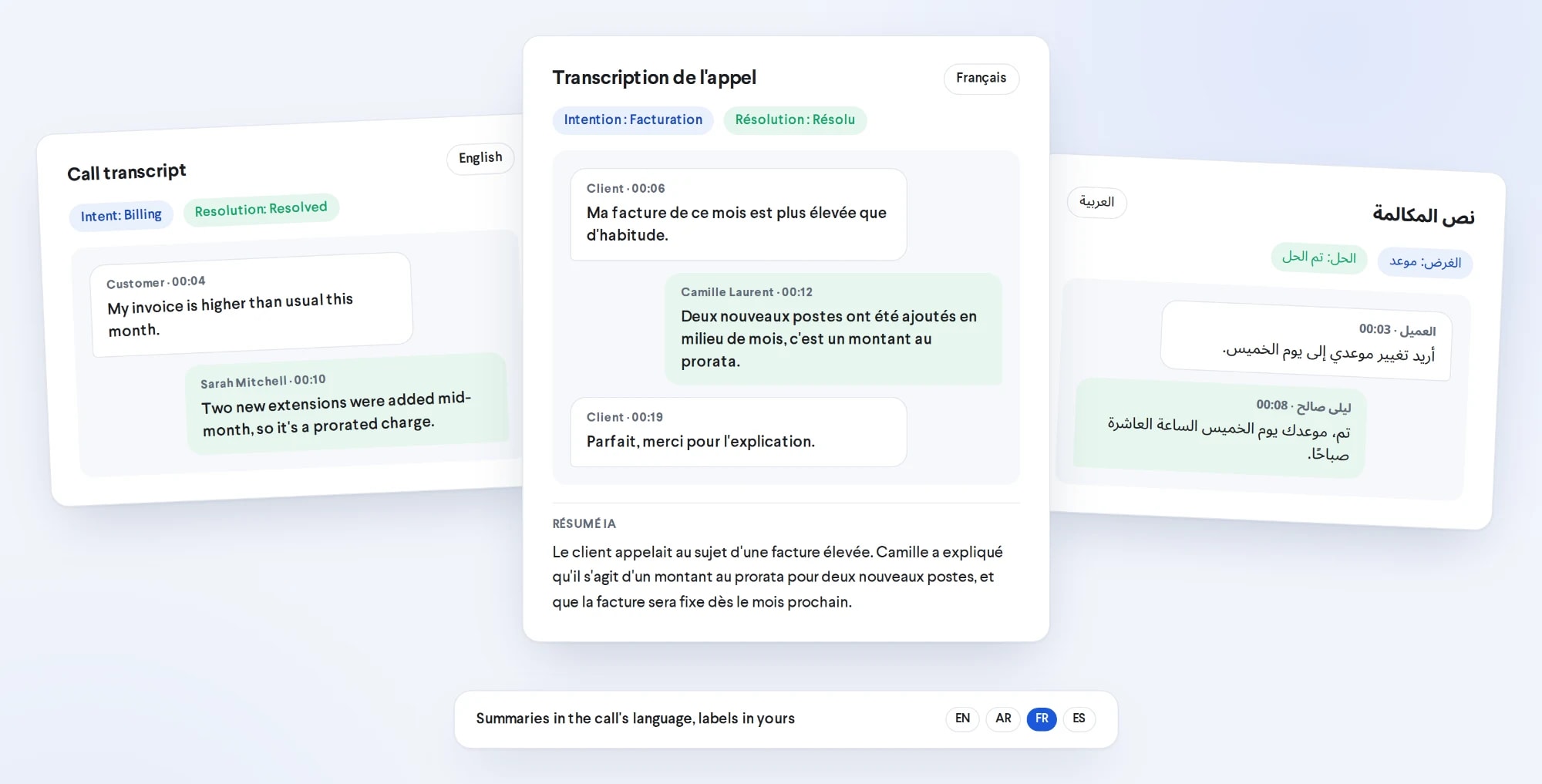
English, Arabic, Italian, French and Spanish — even in the same sentence.
Language is detected automatically, so mixed-language calls are transcribed without any setup. Summaries stay in the language of the call, right-to-left languages read right-to-left, and labels follow each user’s interface language.
- No per-call language setting to manage
- The same insights for every language your team speaks
Turn it on in Settings. Nothing to install.
An admin enables AI transcription for the company, chosen teams or individual members.
Pick inbound, outbound and queue calls and a minimum length. Internal calls are never included.
Recorded calls are transcribed and scored automatically after they end.
Supervisors get escalation alerts, AI insights, Deep Insights, summaries and search across their teams.
One simple add-on. Everything included.
Or $120 per member / year on yearly plans. Available on the Growth and Professional plans.
- 1,500 transcription minutes per member every month
- AI summaries, key points and action items
- Sentiment, intent and resolution on each transcribed call
- Escalations with severity, your own rules, email and CoWork channel alerts
- AI insights dashboard with team and member scorecards
- Deep Insights: issues, products, competitors and repeat callers
- Semantic call search across languages
- Extra minutes $0.01 each; the first month’s fee is prorated
How TalkChief AI compares with Aircall and RingCentral.
Based on each vendor’s public pricing page. Check with the vendor for your region and current packaging.
| Capability | TalkChief | Aircall | RingCentral |
|---|---|---|---|
| Where AI call summaries come from | $10 / member / month add-on on the Growth or Professional plan | Professional plan (“AI call summary and conversation intelligence”) | Conversational Intelligence add-on |
| Published price | Growth plan $15 / member / month (monthly) + $10 add-on | Professional $50 / license / month, 3-license minimum | Add-on “starts at $60”, on top of a RingEX plan (from $20 / user / month billed annually) |
| Transcription minutes | 1,500 per member / month included, then $0.01 / min | Call recordings and AI transcripts listed from Essentials | Depends on plan and add-on |
| Escalation alerts with severity and the exact line | ✓ High / Medium / Low, your own rules, email and CoWork channel alerts | Not listed on the pricing page | Not listed on the pricing page |
| Search calls by meaning | ✓ Across languages | Not listed on the pricing page | Not listed on the pricing page |
| Multilingual calls (English, Arabic, Italian, French, Spanish) and mixed-language calls | ✓ Auto-detected, right-to-left interface for Arabic | Confirm with the vendor | Confirm with the vendor |
Last reviewed September 28, 2026. Sources: Aircall pricing, RingCentral pricing. Prices in USD. All trademarks belong to their respective owners. See also TalkChief vs Aircall and TalkChief vs RingCentral.
AI call transcription FAQs.
What is AI call transcription?
Which calls are transcribed?
Are AI summaries created for every call?
Which languages does it work in?
How much does AI call transcription cost?
Which plans can use it?
What counts as an escalation?
Can we define our own escalation rules?
How are supervisors notified about escalations?
What is Deep Insights?
Does Deep Insights cost extra?
How is semantic search different from keyword search?
Who can see transcripts and escalations?
Is there an API?
Put AI to work across your contact center.
See how transcription fits into routing, supervision and reporting, and where people stay accountable for the outcome.
Plan practical AI-assisted call-center workflows.
Where transcription, summaries and escalation alerts help, and where a person should review before acting.
Read the decision guide →Contact centerQueues, IVR, routing and live monitoring.
The contact-center features that AI Call Intelligence builds on.
Explore contact center →DevelopersAI Transcription API.
Send a recording and receive a diarized, per-speaker transcript: $0.015 per minute, one-minute minimum, then prorated per second.
View the API →